How to Backtest Futures for Free: An NQ Walkthrough
Backtest NQ futures on real historical market data without paying. One real session from start to finish, the trade log, and what Free will not do.
You can backtest NQ futures for free in a browser, with no card and nothing to install. Here's one real session, start to finish, on a TestMax Free account. Every number below came from that session, including the ones that aren't flattering.
The session is Wednesday, September 16, 2026. We picked it for a boring reason: it was the latest complete NQ session in our test window that had a trade. We didn't go looking for a winner.
Write the rules first
If you open the chart before you write the rules, you'll fit the rules to the chart. Everyone does it. So here's the rule set, based on our opening range breakout post:
| Decision | Rule |
|---|---|
| Market and chart | NQ, 5-minute candles, New York time |
| Range | High and low of the 09:30, 09:35 and 09:40 candles |
| Signal | First 5-minute close outside the range, up to the 10:25 candle |
| Entry | Market order as soon as the signal candle closes |
| Stop | Other side of the range |
| Target | Twice the risk |
| Time exit | Out at 11:00 no matter what |
| Limit | One trade a day |
You don't need this strategy. Use your own. It only has to be exact enough that a stranger would take the same trades.
Set up the session
Sign up, then press Start Replay. These are the settings we used:
- Instrument: NQ (E-mini NASDAQ 100). MNQ shows an "Upgrade · Pro" badge on Free, so search for NQ and pick that row.
- Start and end date: September 16, 2026.
- Timeframe: 5m. The 1m to 1d options work on Free.
- Starting balance: $100,000, which is simulated money.
The date picker shows you the Free limit. The window counts back 2 months from the last day of data, and older days are locked. That's the deal: free NQ and ES, but only the recent window.
Get to the open and stop peeking
The chart opens early in the session with everything after that moment hidden. That's the whole point of replay. You can't see the answer.
We used Jump to get close to the open, then pressed Next one candle at a time. The chart shows the timezone saved in Settings > Trading, which is UTC until you change it. Set it to New York, or convert. Our account was set to India, so 09:30 in New York was 19:00 on our screen.
Mark the range
Three candles built the range:
| Candle (New York) | High | Low |
|---|---|---|
| 09:30 | 29,128.75 | 29,088.75 |
| 09:35 | 29,119.50 | 29,081.50 |
| 09:40 | 29,126.50 | 29,095.00 |
That gives a range high of 29,128.75 and a low of 29,081.50. It's 47.25 points wide.
Take the signal
The 09:45 candle closed at 29,168.25. That's above the range, so the rules say buy.
Here's a thing you only learn by doing it: the candle closed almost 40 points past the range high. The breakout line was long gone by the time the rule said yes. If you'd written 29,128.75 in your log as your entry, your results would be fiction. We tested exactly that mistake over 16 years, and it turned a losing strategy into a great one on paper.
We placed a market order for 1 NQ, which filled at the close of the signal candle. Here are the brackets:
| Item | Price | Points from entry |
|---|---|---|
| Entry (filled) | 29,168.25 | |
| Stop | 29,081.50 | 86.75 |
| Target (2R) | 29,341.75 | 173.50 |
At $20 a point, that's $1,735 of risk on one contract. It's a lot more than the range width suggested. One MNQ would have risked a tenth of that, but MNQ needs Pro. On a real account, this is the moment you'd cut the size or skip the trade.
Manage it, or rather, don't
The rules don't let you do anything else, so we stepped forward. Price went up, came back to 29,124.75 around 10:10, and wobbled. It never touched the stop. It never got near the target either.
At 11:00 the time rule ended the trade. We closed at the last price on screen, 29,203.75.
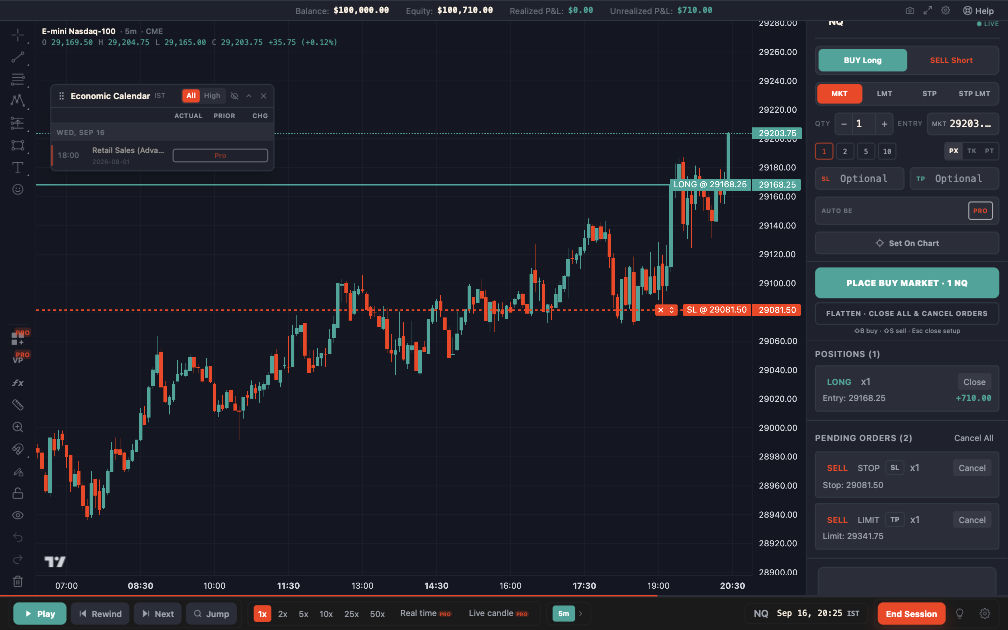
The trade just before the time exit. Our screen shows India time, so 20:25 here is 10:55 in New York.
The result
| Item | Value |
|---|---|
| Gain | 35.5 points |
| Gross result | +$710.00 |
| In R | +0.41R before costs |
| Assumed costs | About $14.50 a round trip |
| After costs | About +$695.50 |
The replay charged no commission or slippage. It showed a clean +$710. The $14.50 is our own estimate: one tick of slippage each way plus $4.50 in fees. Add your broker's real numbers.
A winning trade. Great. It means nothing.
We ran these rules over 3,616 NQ trades since 2010, entering at the next candle's open, and they lost money after costs. One good day tells you the steps work. It tells you nothing about the strategy.
What to do with one session
One session teaches the process. A real test needs a lot more:
- Repeat this for every session in your window, including days with no signal.
- Log each trade the same way. Our journal guide has a template.
- Keep the rules fixed until the sample is finished.
- Get to 100 trades or more of one setup before you trust anything.
Be aware that the Free window limits that last point. Two months gives you roughly 40 NQ sessions. For this rule, that's around 35 trades. It's enough to learn the routine and spot broken rules. It's not enough to judge an edge. You can replay ES as well, but that's a different market and not a bigger sample.
What Free won't do
Here's the honest list for futures on our Free plan, as of November 2026:
- Data stops at the latest 2 months.
- MNQ, MES and GC are Pro.
- Second charts are Pro.
- Context charts are Pro, so it's one chart at a time.
- Challenge Mode is Pro.
- You'll see ads.
If you only want to check whether replay suits you, none of that matters. Run five sessions and see.
Other free options exist too. NinjaTrader is free for coded strategy testing, and TradingView has a free plan. Our free backtesting software guide and the full comparison cover what each one gives you.
Your turn
Write your rules down first. Then open a free account, pick a recent NQ day and take it candle by candle. See the NQ replay page for what's included.
This was a simulated trade on historical data. Simulated results do not predict real results, and nothing here is trading advice.